
Windows 26
The sleekest version yet.
Windows 26 is the sleekest version yet, featuring a vibrant visual identity, colorful gradients, and extensive translucent elements that bring depth and fluidity to the interface. With a completely redesigned taskbar, Start menu, and Action Center, this version represents a major step forward in the project's visual evolution.
What's new
Key Features
Completely Redesigned Taskbar
A fresh, modern taskbar design that anchors the new visual identity with fluid transitions and translucent surfaces.
Redesigned Start Menu
An updated Start menu that complements the new visual identity with colorful gradients and a refined layout.
Redesigned Action Center
A refreshed Action Center that fits the redesigned interface with translucent panels and vibrant accent colors.
Scrollable Widgets
Compact peek widgets sit on the desktop edge. Tap to expand them into a full scrollable view with detailed information like weather forecasts.
Peek Notification
Notifications appear as a subtle pill on the side of the taskbar — like a Wi-Fi connected indicator — without interrupting your workflow.
In action
Screenshots
Scrollable Widgets
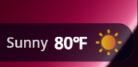
Peek widget
Compact view on the desktop edge
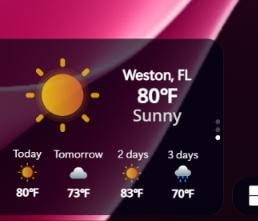
Expanded view
Tap to reveal full scrollable content
Peek Notification
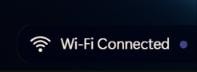
Taskbar-side notification
Subtle pill indicator — no interruptions, no center pop-ups
Tips
Press and hold the desktop to change the background wallpaper.
Right-click the taskbar for more options and customization.
Right-click the Action Center to change the accent color.
Project files
Try Windows 26
Launch the interactive project preview directly in your browser — no installation required.
Windows 26
Launch the interactive project preview directly in your browser.
Runs in a sandboxed iframe — no installation required.